

Creating my first telegram bot with Python
- Nicole Seah
- May 25, 2021
- 3 min read

Updated: Jun 12, 2021
In this post, I'll be elaborating on the functions I've written for a simple bot I made within a day, in addition to what I learnt or could do better. So it's really just a reflection, rather than a guide. (There's a ton of guides on Google and Youtube which would probably explain how to create a bot better than this post!)
I've taken up a module in school called 'Intro to Programming (Python)', but I never had any past experience in building something - the module was only focused on writing code to fulfil test cases, so it wasn't very practical. Hence, I do apologise if this post seems a bit simplified, after all, I'm still learning!
Firstly, the reason why I wanted to create a telegram bot was that I was inspired by a recent Tiktok trend. In this trend, Computer Science students had made auto-responding bots for their partners, which I thought was pretty interesting. Hence, I wanted to make a bot that would respond to my messages in a way that I would appreciate - because honestly sometimes it's hard to expect people to know how to comfort someone else.
There were a few functions I had in mind:
Responding to how I feel - happy or sad
Responding to yes/no questions - to help me make decisions
A random number generator - I sometimes have a hard time deciding what to eat and number off my food choices, hence I thought it would be a good idea to have an easily accessible random number generator
A motivational quote generator - I've written a few quotes in my diary which help me to get rid of negative thoughts, and they are pretty effective, so i thought I'd include them in my bot.
A dad jokes generator - a package a found online which gives funny one-liner dad jokes to lighten the mood
Before I explain my learning and thought process, this is a rough overview of what I managed to get the bot to do.

For the motivational quotes generator, I put in a few quotes in an array. This way, I can randomly choose one of the quotes to display in my message when I command for the bot to "get advice".
I used the same method to include the image address for cute pictures that I wanted to attach to some of the bot's messages. This would ensure that I will not receive the same image or quote each time.
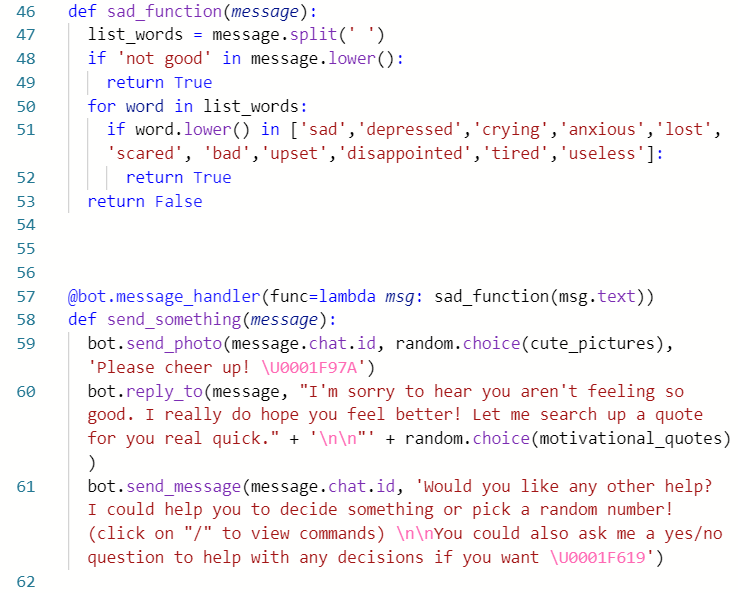
Next, it took me quite a while to figure out how to implement a function outside of @bot.message_handler - and honestly, it was quite simple because all I had to do was ensure msg : (gives a True statement).
This was the function I had written to detect whether a message was sad or happy. I manually included the words for each function.
I had originally wanted to use an emotion-detecting package. However, this would analyse the emotional rating for each message that is sent by the user. And because I did not know how to implement a logical flow for the bot in general, I ended up limiting the emotions to the words I included in the array. So, it may not be able to include all forms of negative/positive feelings.
I used the same method to detect 'yes/no' questions by including words such as 'should', ' would', etc. in the array. Then, I randomly chose 'yes' or 'no' as the bot's reply.
There were a few things I had some trouble figuring out at first, such as how to get the bot to send a message/photo as I did not know how to retrieve the chat_id. Another thing was that I didn't know how to change the unicode to a python version (I only learnt that you need to change '+' to '000' yesterday!)
Overall, it was really fun and I was so engrossed in finishing my bot and making it better. It's also rather easy (to make a simple bot of course) once I understood the documentation better.
However, some things I thought could be improved were:
Making a logical flow - ie a response and answer mechanism
Didn't really read much about 'inline' queries - or rather I got quite confused by them.
Functions could be improved with the in-built keyboards - but I didn't know how to execute an 'if I click A, then the bot will do B'
(Okay, I'm now realising the above are kind of centred around the same thing haha)
Well, that's about all I've got for now regarding creating a telegram bot. Hopefully, I'll be able to improve the bot in the future! Thank you for reading!
Here are some websites I've used:
![What I learnt from DSTA's BrainHack [Computer Vision]](https://static.wixstatic.com/media/0291b6_4c5eedac87ab40e69532948815926ba5~mv2.png/v1/fill/w_624,h_309,al_c,q_85,enc_avif,quality_auto/0291b6_4c5eedac87ab40e69532948815926ba5~mv2.png)

Comments